
This Article Answers
How do you automate contract deadline reminders?
TL;DR
Automated contract deadline reminders help mitigate contractual risk by ensuring you never miss important dates that represent real financial obligations.
Key Facts
- •Automated reminders help mitigate contractual risk
- •Contract deadlines represent real financial obligations whether you're aware of them or not
- •You can set up alerts to view upcoming deadlines and prevent missed deadlines
Setting automated contract deadline reminders can help you mitigate a lot of contractual risk. Whether you’re aware of contract deadlines or not, they still represent very real financial obligations, so you’ll save yourself headaches by staying ahead of them.
Deadline reminders are easy to set up in contract management software like Concord. You can set reminders to be sent just to you, and/or to team members of your choice, in advance of key dates when payment is due, or when contracts renew or expire.
This saves you from having to manually set deadline reminders for every contract in your organization — so you never miss a deadline again. Here’s how.
How to automate contract deadline reminders
Here’s how to turn on automated contract deadline reminders.
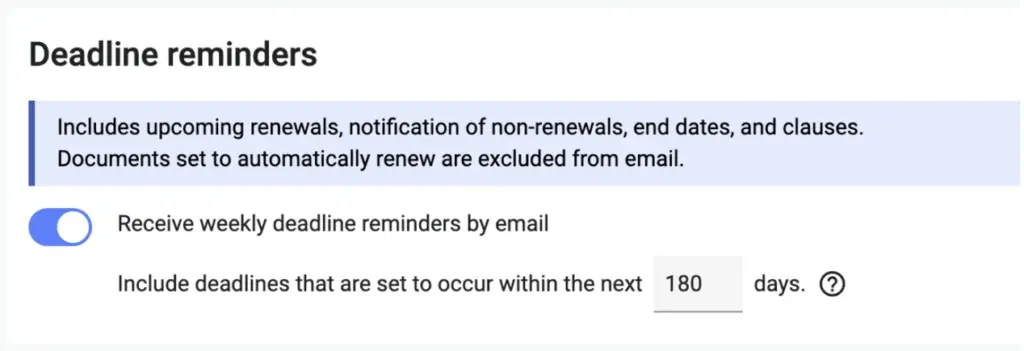 Concord’s automated deadline alerts cover all aspects of your contract deadlines from beginning to end, as well as notices, financial deadlines, and any other relevant contract clauses.
How to view and filter contracts by deadline
You can also view a list of all contracts with upcoming deadlines, and filter and sort by the types of deadlines that are coming up soon.
Here’s how to view, sort and filter contracts by deadline.
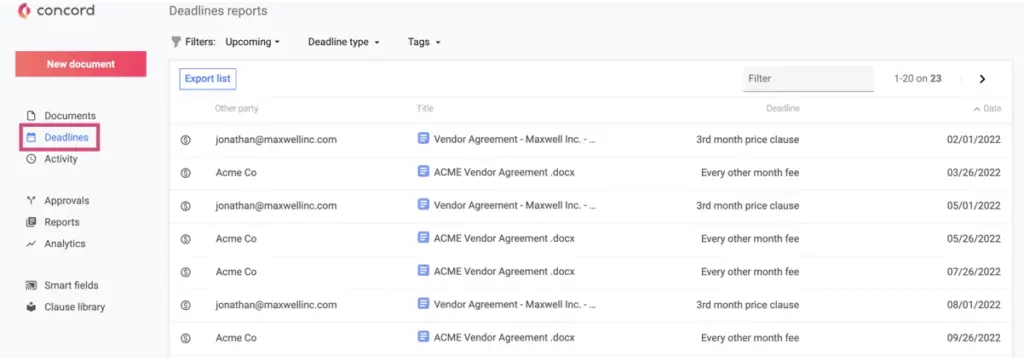 On the Deadlines tab, you’ll see a report of all contracts with upcoming deadlines. You can filter this deadline report by using the Filters to view documents based on their deadline dates, as follows:
-
All: All deadlines
-
Upcoming: Deadlines in the future
-
Past: Deadlines that have already occurred
-
Unknown: Deadline information is unknown
Alternately, you can filter by deadline type:
-
Lifecycle: Lifecycle dates, such as an end date or renewal date
-
Financial conditions: Financial conditions of clauses
-
Main clause: Date-based conditions of clause
How to export contract deadline data to Excel
It’s easy to extract contract conditions as an Excel file, so you can analyze deadline data in Microsoft Office, or in an enterprise resource planning (ERP) or customer relationship management (CRM) tool of your choice.
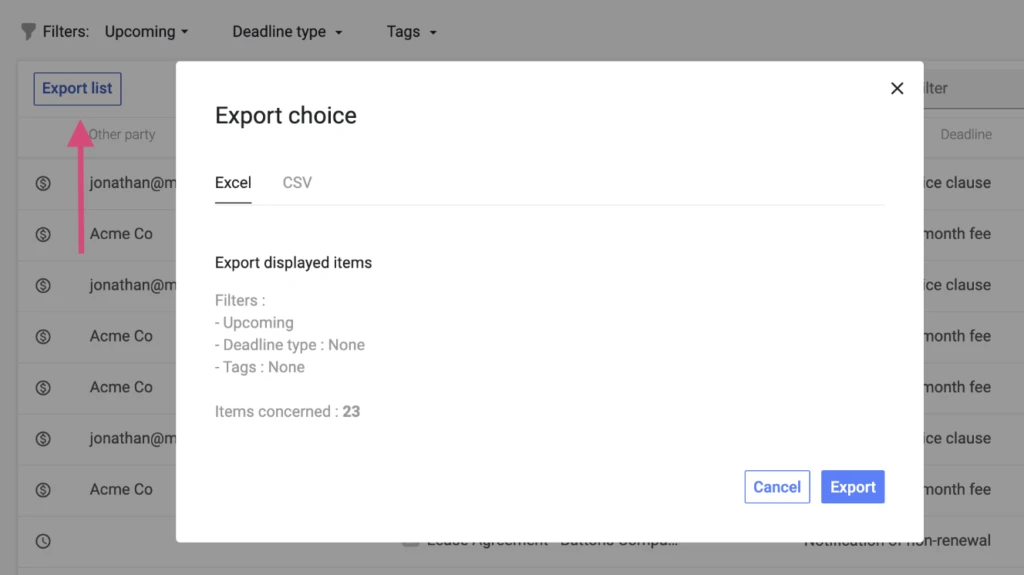 Here’s how to export contract deadline data as an Excel spreadsheet.
How to fill contract details for accurate deadline reminders
Accurate deadline reminders require correct contract data. So when your team creates or imports contracts, make sure they always fill out the lifecycle details.
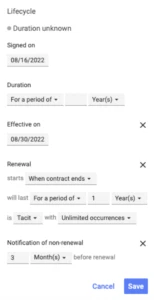 In particular, you’ll want to make sure your team members enter the following info:
If you’ve already filled in those lifecycle details, then setting up deadline reminders just takes a few clicks, as described in the section above.
Although it is possible to set up manual deadline reminders in Outlook or Google Calendar, you’ll have to keep manually setting reminders for every new contract you bring into your system.
A contract management tool saves you from having to do this over and over again — and it enables you to view and filter large numbers of contracts by upcoming deadlines, too.
